
.png)
There’s a quiet problem I see in almost every Microsoft 365 conversation I’m part of.
Not a tooling problem. Not a licensing problem. And definitely not a “we need to buy something new” problem.
It’s this:
Most organisations already own a productivity platform powerful enough to change how they work—but they’re only using a fraction of it.
Email is still the system of record. SharePoint is deployed but underutilised. Compliance exists as a set of features, not a functioning programme. And Microsoft 365, for all its promise, often behaves more like a loose collection of apps than a connected platform.
That’s exactly why Ideagen is launching Activate 365: The SharePoint Intelligence Summit this January.
This isn’t another “what’s new in Microsoft 365” event. It’s a practical, opinionated look at how organisations turn infrastructure into intelligence and finally start getting the return their Microsoft investment promised.
Stop buying tools; start using what you already own
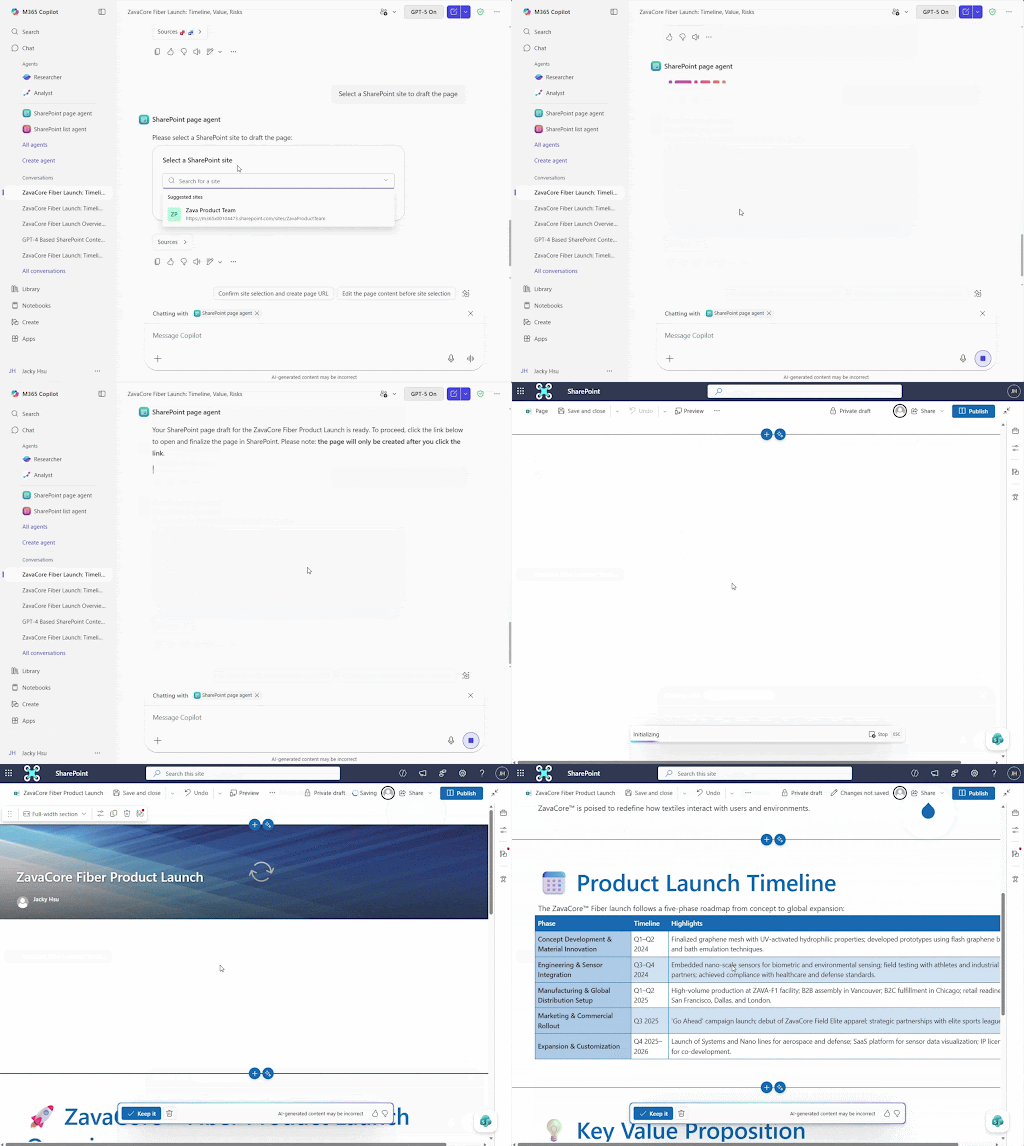
Microsoft has been clear about its direction of travel. Ignite showed us that SharePoint is no longer just a document repository. It’s the home for content, collaboration, and now “intelligence”. Agents, automation, and AI-driven services are being layered directly into the platform. We now even have an Agent Store.
But here’s the uncomfortable truth:
Microsoft provides the foundation. You still have to make it work.
Without structure, governance, and purpose-built workflows, those shiny new capabilities stay theoretical. You can switch these features on, but that doesn’t guarantee outcomes.
Compliance remains reactive. Productivity gains stay hard to measure.
Activate 365 is designed to help you close that gap.
What to expect at Activate 365
Keynote: From infrastructure to intelligence
I’ll be opening the event with a keynote that frames the entire day: From Infrastructure to Intelligence.
We’ll look at what Microsoft’s new SharePoint agents can do — and just as importantly, what they can’t. We’ll cover where automation genuinely helps, where governance still needs an intelligence layer, and why “good enough” governance is costing organisations far more than they realise.
This session is about moving from deployment to optimisation.
From reactive controls to proactive workflows.
From having Microsoft 365 to actually using it as a productivity platform.
Succeeding with Microsoft 365 isn’t about simply turning on Copilots and saying you use them. It’s about genuine productivity gain and improving the figures that impact the bottom line.
P.S. If you fancy a laugh about the wrong way to “succeed” with Microsoft tooling, read this X thread.
Session 1: Beyond the inbox—transforming email into organisational knowledge
Let’s start with the biggest information silo of them all, email.
We’ve all been complaining we get too many emails for decades. Some of us have got good at cleansing our inboxes and filing things away out of sight. But, at an organisational level, we still have a large data-fuelled problem.
Every organisation knows critical decisions, approvals, and context live in inboxes. Yet we still treat email as personal storage rather than organisational knowledge.
In this session, you’ll see how organisations are connecting Outlook and SharePoint to turn emails into searchable, shareable assets—without asking users to change how they work.
If you’ve ever said “I know it’s in an email somewhere”, this session is for you.
You’ll leave understanding:
- The real cost of email inefficiency
- How to surface trapped knowledge without manual filing
- How teams are seeing measurable ROI in weeks, not months
Session 2: Compliance by design—building the governance layer SharePoint needs
SharePoint is already a compliance platform. Most organisations just don’t use it like one.
This session digs into why so many compliance features sit dormant.
Spoiler alert: It’s not because they don’t exist. It’s because they lack the workflows and intelligence to operate at scale.
You’ll see how organisations are layering purpose-built governance capabilities on top of SharePoint to create proactive, defensible compliance programmes without introducing yet another system.
This is about turning features into a functioning compliance engine.
Session 3: The connected workplace—breaking down Microsoft 365 silos
Microsoft 365 was designed as an integrated platform. So why does it still feel like hard work?
This session focuses on eliminating the toggle tax and—the hidden productivity drain (and cost) caused by constantly switching between apps, windows, and contexts all day.
You’ll learn how leading organisations are embedding SharePoint and Microsoft 365 functionality directly into Teams, Outlook, and everyday workflows—meeting users where they already are.
Less friction. Better adoption. Higher ROI.
Who should attend Activate 365?
You. If you’ve read this far, we’ve got you. And rightly so. You understand and appreciate the challenges SharePoint users and admins face today despite Microsoft’s latest flashy feature announcements.
Activate 365 is built for people who are done hearing what Microsoft 365 can do and want to see how to make it work in the real world.
That includes:
- IT and SharePoint leaders under pressure to show ROI
- Compliance, risk, and audit professionals seeking defensible governance
- Operations and project leaders tired of knowledge loss
- Anyone responsible for turning Microsoft 365 into a business platform, not just a licence line item
Activate what you already have
The competitive advantage isn’t buying more tools. It’s activating the ones you already own.
If you’re ready to move beyond deployment, beyond features, and beyond “good enough” — Activate 365 is where that journey starts.
Save your spot and start turning Microsoft 365 into the productivity platform it was meant to be.
Explore email management solutions
Email management solutions helps project and client-based businesses streamline their email processes.
Activate 365: The SharePoint intelligence summit
Every organization has Microsoft 365 licenses. Few are using them to their full potential. Join us for three focused sessions showing how to turn SharePoint and Outlook into engines for compliance, productivity and competitive advantage, building on the infrastructure you already have.